24 Skills for Coding Agents
Coding agents are most useful when they understand not only the immediate request, but also how a particular kind of work should be done. A skill packages reusable instructions, and sometimes supporting scripts or reference files, that an agent can load for a specialized task. Instead of pasting the same checklist into every conversation, you can write it once, review it, improve it, and share it with other people working in the same project.
Skills are useful for recurring work such as reviewing a pull request, building a workshop page, validating an analysis, preparing a release, or following an organization’s reporting conventions. They do not make a model an expert in the human sense. They give the agent task-specific context and a procedure to follow.
The first draft of this page was created with the repository’s page-maker skill. That skill told the coding agent how to distinguish integrated and example pages, inspect nearby chapters, verify claims, handle renaming safely, validate the rendered page, and report limitations. The author still selected the topic, supplied the figures, approved placement and filename changes, and remains responsible for the final content.
24.1 What a Skill Adds
A prompt usually addresses one interaction: “Explain this error” or “Add a new chapter.” A skill captures the stable procedure behind many similar interactions. For example, a page-building skill can require the agent to:
- determine what kind of page is being requested;
- inspect the workbook structure and nearby content;
- avoid overwriting existing work;
- verify current claims with appropriate sources;
- render only the affected page when possible; and
- distinguish completed checks from work that was not executed.
This turns tacit expectations into an inspectable process. The skill can reduce repeated explanations, promote consistency across sessions, and preserve lessons learned about how the project actually works. Because it is a text file under version control, team members can review changes to the procedure just as they review changes to code.
24.2 Anatomy of a SKILL.md File
The open Agent Skills specification defines a skill as a directory containing at least one file named SKILL.md.1 That file has two parts:
- YAML frontmatter supplies metadata used to identify the skill and decide when it is relevant.
- Markdown instructions tell the agent what to do after the skill is activated.
A minimal skill looks like this:
---
name: workshop-page-review
description: Review a Quarto workshop page for clarity, accuracy, safe execution, and fit with nearby chapters. Use when a workshop page needs revision or validation.
---

# Review workflow

1. Read the project configuration and the target source page.
2. Inspect the preceding and following chapters for overlap.
3. Verify factual claims with primary or official sources.
4. Make focused edits without changing unrelated files.
5. Render the target page and inspect the visible result.
6. Report what was checked and what remains unresolved.
The name is a stable identifier. The description is especially important because an agent may use it to decide whether the skill applies to a request. The body can contain headings, ordered steps, decision rules, examples, validation criteria, and instructions for handling failures.
A skill directory can also include optional resources:
workshop-page-review/
|-- SKILL.md
|-- references/
|   `-- editorial-guidance.md
|-- scripts/
|   `-- check-links.R
`-- assets/
    `-- page-template.qmd
This structure supports progressive disclosure. The agent can see a short name and description when considering which skill to use, load the full instructions when the skill is selected, and read or execute supporting resources only when the task requires them. This keeps specialized detail available without placing every instruction into every conversation.
For inspiration, the community-curated repository agentic-awesome-skills collects examples of skills people have built for different workflows and toolchains. Browsing a few examples can help you see how reusable procedures are packaged and shared in practice.
A skill can direct an agent to read files, run scripts, or use tools. Treat a skill obtained from another person or repository as you would other executable project configuration: inspect its instructions, supporting files, requested permissions, external connections, and data-handling behavior before enabling it.
24.3 Skills as Procedural Knowledge
One helpful way to organize sources of agent capability is to ask what each source contributes. In the following comparison from IBM Technology, MCP is associated with access to tools, retrieval-augmented generation (RAG) with retrieved factual material, fine-tuning with changes to model weights, and skills with procedural knowledge.
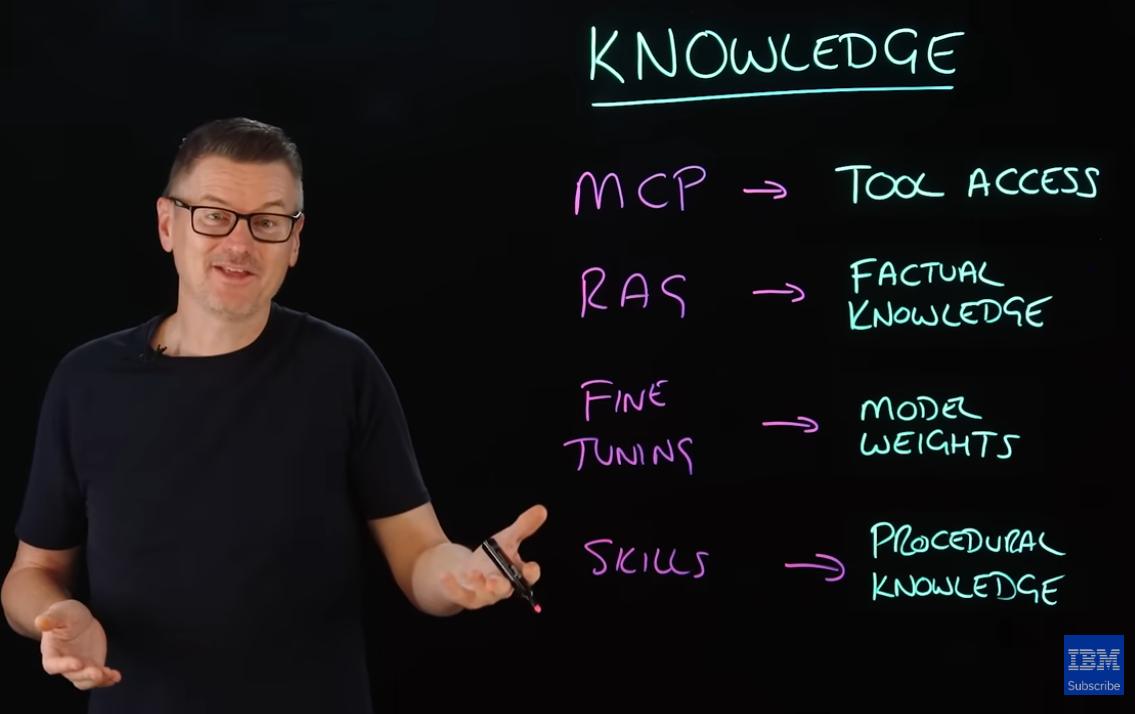
Figure Figure 24.1 is a useful orientation, but the categories are not mutually exclusive. A skill can tell an agent when and how to use an MCP tool or a RAG system. RAG provides retrieved context rather than guaranteed factual truth. Fine-tuning can affect behavior as well as stored associations. The comparison is best read as a map of each method’s primary role, not a complete technical taxonomy.
24.4 Skills and Memory
A second analogy compares kinds of human memory with common agent mechanisms. Semantic memory concerns general facts and concepts, episodic memory concerns events or experiences, and procedural memory concerns how to carry out a task. The IBM Technology video maps these loosely to RAG, logs, and skill files.
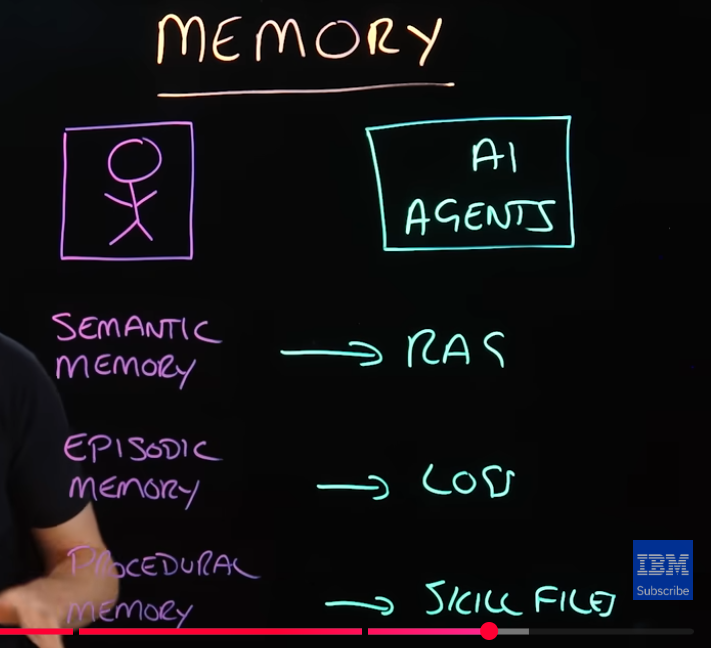
The middle word in Figure Figure 24.2 is logs. Logs can preserve a record of prior actions, while a skill preserves guidance for future actions. Again, this is an analogy rather than a claim that an AI system remembers exactly as a person does. A RAG system retrieves selected external material; a log records events; and a skill supplies instructions. Whether any of these sources are available, retained, or loaded depends on the particular product and its configuration.
24.5 When to Build a Skill
A custom skill is a good candidate when:
- you repeatedly paste the same instructions or checklist;
- a task has important branching decisions or failure cases;
- quality depends on a consistent review and validation sequence;
- newcomers need access to project-specific procedures; or
- the process improves over time and should be versioned with the project.
A skill may be unnecessary for a one-time question, a short preference that belongs in general project instructions, or a deterministic operation better implemented as a script. Skills and scripts often work well together: the skill explains when and why to perform a check, while the script performs the repeatable computation.
24.6 Design Skills That Can Be Trusted
Start with a narrow outcome and realistic trigger description. State required inputs, boundaries, decision points, and completion checks. Make side effects explicit: distinguish reading from editing, local checks from network requests, and free operations from paid services. Include instructions for what to do when information is missing rather than encouraging the agent to guess.
Then test the skill with representative requests. Check two different questions:
- Routing: Does the agent use the skill when it should and avoid it when it should not?
- Performance: When used, does the skill produce a better and more reliably validated result than the same request without it?
Skills are maintained procedures, not finished products. Revise them when they trigger too broadly, omit a recurring edge case, rely on an outdated interface, or authorize more access than the task requires.
The next chapters shift from configuring the coding agent to applying AI-assisted development in R and Shiny. Skills provide one way to make that collaboration more deliberate, repeatable, and reviewable.
The descriptions of Agent Skills, GitHub Copilot support, and Claude Code support were checked against the Agent Skills specification, GitHub Copilot documentation, and Claude Code documentation on September 19, 2026. Figures are author-supplied screenshots from IBM Technology’s video, “What AI Agent Skills Are and How They Work”.↩︎