So far, we’ve focused on interacting with generative models in one-off interactions, where the chat history is not preserved. This functionality differs substantially from the normal chatbot interface user experience. These transactional interactions may not be helpful if you need to build on the same conversation over time.
Before diving into conversational interactions via R, it will be helpful to briefly provide more detail on how LLMs produce text in a conversation. When a chatbot first receives your prompt, there are already a host of unseen instructions that have been provided to guide its response. It then analyzes your prompt and, based on its training, unseen instructions, and the text it has received so far, generates the first token of the response. Then, prior to generating the next token, the process starts again, but this time the prompt to the model includes the token that was just generated.
For example, let us say you send the prompt, “Tell me why validity is important in educational measurement in one sentence,” and the model responds, “Validity is important in educational measurement because it ensures that test scores support accurate and appropriate interpretations and decisions about what students know and can do.”
Although the sentence is produced almost seamlessly, this masks the internal process taking place. After receiving your prompt, the model evaluates the context and predicts the next token. (I will use words instead of token for the rest of the example to make it easier to follow.) After going through its internal process, it may predict that the most appropriate next word is “Validity.”
It then starts an autoregressive process, and the prompt effectively becomes: “Tell me why validity is important in educational measurement in one sentence; Validity”
From that, it may predict that the next token is “is”: “Tell me why validity is important in educational measurement in one sentence; Validity is”
The autoregressive process starts again: the prompt is now “Tell me why validity is important in educational measurement in one sentence; Validity is” and the predicted next word is important. And so on until the sentence is completed.
You may have noticed this in earlier versions of online conversational chatbots—it seemed like the model was typing out the words as it responded. This was not just a parlor trick or fancy UI. It reflected the fact that the response was being generated incrementally, token by token.
Conversational chats are similar. When you continue a conversation after an initial model response, the model uses the accumulated conversation history to predict the next token: your initial prompt, the model’s first response, and your second prompt. This continues as the conversation progresses. If you are sending your fifth prompt to the model, the model is effectively evaluating the prior conversation history—four preceding prompt-response pairs, plus your current prompt—when predicting the next token to produce.
If you need to have a conversational interaction with a model, I generally prefer using the normal online chatbot interface. It has been designed to be efficient and useful, you can access past chat histories easily, and there are other features that make interaction easier (adding tools, uploading documents or images, etc.).
However, there may be instances in which you want to have the conversation from the console, or you may only have access to a secure API that does not retain prompts or conversation history. In these instances, the ellmer package, developed by Posit, offers an easy way to have conversational interactions with a variety of generative AI models.
13.2 Conversational Interactions in R
We’ll continue to use our Anthropic API key, although ellmer supports interactions with a variety of model providers, including OpenAI, Google Gemini, DeepSeek, Mistral, Hugging Face, and Perplexity. What follows can mostly be generalized to working with other models, with some slight differences that you can learn about by consulting the ellmer website linked above.
13.3 Quick Start
The easiest way to start a conversation is just to use the default settings for a model. For the purposes of demonstration in our workshop, there’s no need to change it, but you can find all of those details at the ellmer website. You can see what Anthropic models are available with the following:
Code
library(ellmer)models_anthropic()
                           id              name created_at cached_input input
1            claude-haiku-5-5  Claude Haiku 5.5 2026-10-07           NA    NA
2           claude-sonnet-5-5 Claude Sonnet 5.5 2026-09-28           NA    NA
3             claude-opus-5-5   Claude Opus 5.5 2026-09-21           NA    NA
4            claude-fable-5-1  Claude Fable 5.1 2026-08-28         0.25    10
5               claude-opus-5     Claude Opus 5 2026-07-24         0.50     5
6             claude-sonnet-5   Claude Sonnet 5 2026-06-29         0.20     2
7              claude-fable-5    Claude Fable 5 2026-06-07         1.00    10
8             claude-opus-4-8   Claude Opus 4.8 2026-05-28         0.50     5
9             claude-opus-4-7   Claude Opus 4.7 2026-04-14         0.50     5
10          claude-sonnet-4-6 Claude Sonnet 4.6 2026-02-17         0.30     3
11            claude-opus-4-6   Claude Opus 4.6 2026-02-04         0.50     5
12   claude-opus-4-5-20251101   Claude Opus 4.5 2025-11-24         0.50     5
13  claude-haiku-4-5-20251001  Claude Haiku 4.5 2025-10-15         0.10     1
14 claude-sonnet-4-5-20250929 Claude Sonnet 4.5 2025-09-29         0.30     3
   output
1      NA
2      NA
3      NA
4      50
5      25
6      10
7      50
8      25
9      25
10     15
11     25
12     25
13      5
14     15
The “input” column is the cost per million tokens of model input (the prompts). The “output” column is the cost per million tokens of the model response. For some context, Shakespeare’s Romeo and Juliet is about 25,000 words, which roughly translates to 40,000 tokens (depends on the tokenization method of the model). Output tokens are often more expensive than input tokens in part because generating a response is an autoregressive process: the model must repeatedly predict the next token, updating the context at each step, rather than producing the full response all at once.
Code
# Gets the API from the .Renviron file, if using this methodapi_key <-Sys.getenv("ANTHROPIC_API_KEY")# Prompts the User to enter their API key; flip for workshop# Sys.setenv(ANTHROPIC_API_KEY = rstudioapi::askForSecret("Anthropic API Key"))# The workshop uses Claude Sonnet 5 for this conversation.# I've included a system prompt, which we'll discuss below.chat <-chat_anthropic(system_prompt ="You explain things concisely, focusing on only the most significant parts of the response.",model ="claude-sonnet-5")
There are two ways of using ellmer for conversational chats.
13.4live_console
The first is creating a temporary live_console, which most resembles the functionality of the chatbot interface. This can be done two ways: within the R console, and by leveraging the shinychat package to have the interaction open in a browser (the viewer window) via live_browser. Once you run the live_console(chat) argument, you’ll notice that the console below changes to have three angle brackets (>>>) instead of the usual single angle bracket (>). The following message also appears to help alert you that you’ve entered the console mode:
╔═══════════════════════════════╗
║ Entering chat console.        ║
║ Use """ for multi-line input. ║
║ Type 'Q' to quit.             ║
╚═══════════════════════════════╝
This interactivity is hard to show in a static document, so I have copied-and-pasted a short interaction below:
13.4.1live_console Example
> live_console(chat)
╔═══════════════════════════════╗
║ Entering chat console.        ║
║ Use """ for multi-line input. ║
║ Type 'Q' to quit.             ║
╚═══════════════════════════════╝
>>> Generate short description of why validity is important in educational research. The audience is a lay person. The explanation should only be two sentences.
Validity ensures that a test or study actually measures what it claims to measure, so the results are trustworthy and meaningful. Without
validity, educators and policymakers could make important decisions about students and schools based on misleading or inaccurate information.

>>> Generate a similar response about reliability.
Reliability ensures that a test or measurement produces consistent results every time it is used, much like a scale that gives you the same
weight each time you step on it. Without reliability, it would be impossible to know whether differences in student performance are due to
actual learning or simply random errors in the measurement tool.

>>> Generate another response about how these are important for fairness and equity. This should be no more than 5 sentences.
When tests are both valid and reliable, all students have a fair opportunity to demonstrate their true knowledge and abilities, regardless of
their background. If a test is invalid or unreliable, certain groups of students may be unfairly disadvantaged, leading to biased outcomes in
areas like college admissions, graduation requirements, or special education placement. For example, a test that contains culturally biased
language may not accurately measure a student's actual knowledge, but instead reflect their familiarity with a particular culture. Ensuring
validity and reliability helps educators identify and close achievement gaps rather than create or reinforce them. Ultimately, valid and
reliable assessments are essential tools for building an educational system that treats every student with fairness and equity.

>>> Q
13.4.2live_browser demo
Alternatively, by also using the shiny and shinychat packages, you have have the same interaction appear in your “Viewer” window of the R Studio screen. One you have provided your API key and set the initial chat details (as above), you the execute the following:
Now let’s look at the second method for conversational chats, the interactive call method. Below I’ve prompted the model via chat$chat("prompt"), and then immediately used the same syntax again (with a different prompt). I’ve hidden the output because it’s so long; you’ll need to click to see the prompt and model response.
NoteClick to see first prompt and response
Code
chat$set_turns(list())chat$chat("Tell me about the history of the exploration of the moon")
# Moon Exploration: Key Highlights

**Early Period (1958-1960s)**
- Soviet Luna program launched first successful missions, with Luna 2 (1959)
becoming first human-made object to reach the Moon
- Luna 3 captured first images of the Moon's far side

**The Space Race Era (1960s-1970s)**
- US Apollo program became the centerpiece of lunar exploration
- Apollo 11 (1969): First crewed landing, Armstrong and Aldrin walked on the
surface
- Five more successful crewed landings followed (Apollo 12-17, excluding the
aborted Apollo 13)
- Soviet Union achieved robotic sample returns (Luna 16) and deployed rovers
(Lunokhod)

**Quiet Period (1970s-1990s)**
- Lunar exploration slowed dramatically after Apollo ended in 1972
- Focus shifted to space stations and other planetary targets

**Renewed Interest (1990s-2000s)**
- Clementine (1994) and Lunar Prospector (1998) - US missions mapping the Moon,
finding evidence of water ice
- Growing international participation began

**Modern Multi-Nation Era (2000s-present)**
- China's Chang'e program: orbiters, landers, rovers, and sample returns
(Chang'e 5 in 2020)
- India's Chandrayaan missions, including Chandrayaan-3's historic south pole
landing (2023)
- Japan, Israel, and private companies have also attempted/achieved lunar
missions
- NASA's Artemis program aims to return humans to the Moon, with eventual goals
of sustainable presence

**Key Themes**
- Shift from superpower competition to broader international and commercial
involvement
- Growing focus on lunar south pole due to water ice deposits
- Renewed interest driven by plans for sustainable bases and Mars mission
preparation

Would you like me to expand on any particular era or mission?
NoteClick to see follow-up prompt and response
Code
chat$chat("What are the most important non-USA exploration missions?")
# Major Non-US Lunar Missions

**Soviet Union (Pioneers)**
- **Luna 2** (1959) - First spacecraft to reach the Moon
- **Luna 3** (1959) - First images of the Moon's far side
- **Luna 9** (1966) - First soft landing on another world
- **Luna 16** (1970) - First robotic sample return mission
- **Lunokhod 1** (1970) - First robotic rover on another world

**China (Most Active Modern Program)**
- **Chang'e 3** (2013) - Lander/rover mission, first soft landing since 1976
- **Chang'e 4** (2019) - First-ever landing on the Moon's far side
- **Chang'e 5** (2020) - Sample return mission, first since Soviet Luna 24
(1976)
- **Chang'e 6** (2024) - First samples ever returned from the far side

**India**
- **Chandrayaan-1** (2008) - Orbiter that helped confirm water ice at the poles
- **Chandrayaan-3** (2023) - First successful landing near the lunar south pole

**Japan**
- **Hiten** (1990) - Japan's first lunar mission
- **SELENE/Kaguya** (2007) - Major orbiter mission, detailed mapping and
science

**Europe**
- **SMART-1** (2003) - ESA's first lunar mission, tested ion propulsion

**Israel**
- **Beresheet** (2019) - Private/government attempt; crashed but notable as a
non-superpower effort

**Why These Matter**
- China's program represents the most sophisticated non-US effort, achieving
feats (far-side landing, far-side sample return) the US and USSR never
attempted
- India's success on a relatively low budget signaled new possibilities for
cost-effective exploration
- The Soviet "firsts" fundamentally shaped the entire field of lunar science
before Apollo even launched
As you can see, the second response from the model takes into context the first prompt - it’s still talking about the moon! This conversational functionality is useful when you’re doing iterative development or planning, as the previous calls to the model are important for providing content and building upon previous prompts and model responses.
It’s important to note the params argument, which allows you to set a variety of model parameters when chatting with the model. This is a general argument in the ellmer package. You’ll need to ensure that your model input allows a specific generation parameter before including it in your call.
This is one place where having a conversation with a model via API instead of via a chatbot interface is different - it’s not always easy (and sometimes impossible) to change these parameters in the normal chat interface.
There are two methods to reset the chat history. when you’re using the interactive call method. This is useful when you want to start a conversation about another topic.
13.6.1.1 Clearing While Maintaining Chat Configuration
The following syntax simply clears the turns but maintains the other aspects of the chat configuration (which we’ll discuss momentarily). In the background the ellmer package is saving a history of your prompts and model responses, and it sending this history as part of the prompt when you send a new prompt. This is also happens when having a conversation with a chatbot, but it’s even less obvious.
Code
chat$set_turns(list())
13.6.1.2 Clearing All Chat Settings
This starts an entirely new chat with the Anthropic model, and removes any settings you’ve made (system prompt, parameters). You can also include this in your argument - the important part is that using chat_anthropic() again resets any previously-specified chat configuration.
Code
chat <-chat_anthropic()
13.6.2 Retaining the Chat History
As you interact with a generative AI model through ellmer, a record of your prompts and model responses are stored in chat$get_turns(). When you examine this list object, each odd-numbered entry (starting with 1) are your prompts, and each even-numbered entry is the model response.
NoteClick to see an example of saving the chat history.
Code
chat <-chat_anthropic()chat$chat("Give me a 5-sentence history of educational measurement.")chat$chat("Give me a 5-sentence summary of educational measurement breakthroughs since 2000.")ed_meas_chat <- chat$get_turns()save(ed_meas_chat, file ="./data/ed_meas_chat.Rdata")
Code
load("data/ed_meas_chat.Rdata")ed_meas_chat[1]
[[1]]
<Turn: user>
Give me a 5-sentence history of educational measurement.
Code
ed_meas_chat[2]
[[1]]
<Turn: assistant>
Educational measurement began in ancient China with civil service examinations around 600 CE, which used standardized written tests to select government officials based on merit rather than social status. The modern era of educational testing emerged in the early 20th century when psychologists like Alfred Binet developed intelligence tests, leading to the creation of standardized achievement tests for schools. The post-World War II period saw massive expansion of standardized testing in American education, particularly with the development of multiple-choice formats and machine scoring that made large-scale assessment feasible. The 1960s-1980s brought significant advances in test theory and statistics, including item response theory and more sophisticated methods for ensuring test validity and reliability. The contemporary era has been marked by high-stakes accountability testing mandated by policies like No Child Left Behind (2001), alongside growing debates about test bias, over-testing, and the development of alternative assessment methods including computer-adaptive testing and performance-based evaluation.
Code
ed_meas_chat[3]
[[1]]
<Turn: user>
Give me a 5-sentence summary of educational measurement breakthroughs since 2000.
Code
ed_meas_chat[4]
[[1]]
<Turn: assistant>
Since 2000, computer-adaptive testing (CAT) has revolutionized educational assessment by using algorithms to adjust question difficulty in real-time based on student responses, providing more precise measurements with fewer items. The development of sophisticated psychometric models, including multidimensional item response theory and diagnostic classification models, has enabled educators to obtain more detailed information about student knowledge and skill profiles rather than just overall scores. Large-scale international assessments like PISA have expanded globally and incorporated innovative item types, including interactive simulations and collaborative problem-solving tasks that measure 21st-century skills. Automated scoring technologies using natural language processing and machine learning have made it possible to reliably evaluate constructed-response items and essays at scale, reducing costs and turnaround times. The integration of learning analytics and continuous assessment through digital platforms has enabled real-time monitoring of student progress and the collection of rich behavioral data that provides insights beyond traditional test scores.
13.7 System Prompts
We briefly discussed system prompts in the section about generative parameters. The system prompt is an instruction to the model that is maintained throughout all of your interactions with the model. I don’t generally use system prompts when calling models via API, but I probably should. 😅 Nonetheless, let’s see how changing the system prompt can change the model output.
First, with no setting of the system prompt:
Code
chat <-chat_anthropic()
Using model = "claude-sonnet-5".
Code
chat$chat("Briefly tell me the point of using a Rasch model.")
# The Point of Using a Rasch Model

The Rasch model is a psychometric approach used primarily in educational and
psychological measurement. Its key purposes are:

1. **Creating interval-level measurement** – It transforms raw ordinal data
(like test scores) into interval scales, allowing for more meaningful
mathematical comparisons.

2. **Separating person ability from item difficulty** – It places both
test-takers' abilities and items' difficulties on the same scale, allowing you
to compare them directly.

3. **Testing if items "work together"** – It checks whether all items on a test
are measuring a single, coherent underlying trait (unidimensionality).

4. **Enabling fair comparisons** – Because measurement is independent of the
specific sample of people or specific set of items used, you can compare:
   - Different people even if they took different test items
   - Different items even if answered by different groups of people

5. **Diagnosing item/person fit** – It identifies poorly functioning test items
or unusual response patterns from test-takers (misfit statistics).

**In short:** Rasch modeling helps create rigorous, fair, and generalizable
measurements of unobservable traits (like ability, attitude, or severity) from
observed categorical data (like right/wrong answers or rating scale responses).

It's widely used in education (standardized testing), health sciences
(patient-reported outcomes), and social sciences (attitude surveys).
Code
## rano <- as.character(rasch_normal)
Now using a playful system prompt:
Code
chat <-chat_anthropic(system_prompt ="You are an assistant that likes to respond in rhymes.")
Using model = "claude-sonnet-5".
Code
chat$chat("Briefly tell me the point of using a Rasch model.")
A Rasch model's aim, plain to see,
Puts items and people on one scale, you'll agree.
It measures ability, skill, or trait,
And checks if your test items truly rate.

It shows if a question is easy or hard,
And ranks each person's skill, unmarred,
By guessing or bias that might interfere—
Just pure measurement, clean and clear.

So the point, in short, is simply this:
Fair, consistent scores you won't miss,
Turning raw answers to a logit line,
Where ability and difficulty align.
Some more helpful examples of good system prompts are:
Specifying Output Structure
“Always respond in JSON format with keys: ‘answer’, ‘confidence’, ‘sources’. Never include any text outside the JSON object.”
Setting Constraints
“You are a medical information assistant. Always:
Emphasize you’re not a doctor
Recommend consulting healthcare professionals
Cite medical sources when possible
Never diagnose conditions”
13.7.1 Retaining the Chat History with the System Prompt
The system prompt is also retained in the chat history, and can be accessed by specifying chat$get_turns(include_system_prompt = TRUE). The list object now has the system prompt as the first object, meaning that your prompts are now every even-numbered object, and the system responses are every odd-numbered object, started at 3.
NoteClick to see an example of saving the chat history with the system prompt.
Code
chat <-chat_anthropic("You respond only with the 5 most important sentences about a topic.")chat$chat("Give me a summary of the history of educational measurement.")chat$chat("Give me a summary of educational measurement breakthroughs since 2000.")ed_meas_chat_wsp <- chat$get_turns(include_system_prompt =TRUE)save(ed_meas_chat_wsp, file ="./data/ed_meas_chat_wsp.Rdata")
[[1]]
<Turn: system>
You respond only with the 5 most important sentences about a topic.
Code
ed_meas_chat_wsp[2]
[[1]]
<Turn: user>
Give me a summary of the history of educational measurement.
Code
ed_meas_chat_wsp[3]
[[1]]
<Turn: assistant>
Educational measurement began in ancient China around 2200 BCE with civil service examinations, but modern scientific approaches emerged in the late 19th century when psychologists like Francis Galton and James McKeen Cattell developed the first standardized mental tests. Alfred Binet's 1905 intelligence test marked a crucial breakthrough by focusing on complex mental processes rather than simple sensory tasks, leading to the widespread adoption of IQ testing in schools. The early-to-mid 20th century saw the rise of large-scale standardized testing, including college entrance exams and military aptitude tests during World War I, establishing psychometrics as a formal scientific discipline. The latter half of the 20th century introduced more sophisticated statistical methods like Item Response Theory and criterion-referenced testing, moving beyond simple norm-referenced comparisons to focus on specific learning objectives. Today's educational measurement continues to evolve with computer-adaptive testing, authentic assessment methods, and ongoing debates about standardized testing's role in education policy and student evaluation.
Code
ed_meas_chat_wsp[4]
[[1]]
<Turn: user>
Give me a summary of educational measurement breakthroughs since 2000.
Code
ed_meas_chat_wsp[5]
[[1]]
<Turn: assistant>
Computer-adaptive testing (CAT) became widespread in the 2000s, allowing tests to adjust question difficulty in real-time based on student responses, making assessments more efficient and precise while reducing testing time. Item Response Theory (IRT) advanced significantly with new models and computational power, enabling more sophisticated analysis of test items and better measurement of student abilities across different populations and contexts. The integration of artificial intelligence and machine learning revolutionized automated scoring systems, particularly for constructed-response items and essays, making large-scale assessment of complex skills more feasible and cost-effective. Digital portfolios and performance-based assessments gained prominence as technology enabled the collection and analysis of authentic student work, providing richer evidence of learning beyond traditional multiple-choice formats. Learning analytics emerged as a powerful new field, leveraging big data from educational technologies to provide continuous, formative assessment information and personalized learning insights rather than relying solely on summative testing.
Source Code
# Conversational Interactions via APISo far, we've focused on interacting with generative models in one-off interactions, where the chat history is not preserved.This functionality differs substantially from the normal chatbot interface user experience.These transactional interactions may not be helpful if you need to build on the same conversation over time.There is an activity that you can download to follow along with the syntax below:<a href="downloads/activity-conversations-via-api.Rmd" download style="display: inline-block; padding: 10px 20px; background-color: #4A90E2; color: black; text-decoration: none; border-radius: 5px;"> 📥 Download `activity-conversations-via-api.Rmd`</a>## Chatbot FunctionalityBefore diving into conversational interactions via R, it will be helpful to briefly provide more detail on how LLMs produce text in a conversation.When a chatbot first receives your prompt, there are already a host of unseen instructions that have been provided to guide its response.It then analyzes your prompt and, based on its training, unseen instructions, and the text it has received so far, generates the first _token_ of the response.Then, prior to generating the next token, the process starts again, but this time the prompt to the model includes the token that was just generated. For example, let us say you send the prompt, "Tell me why validity is important in educational measurement in one sentence," and the model responds, "Validity is important in educational measurement because it ensures that test scores support accurate and appropriate interpretations and decisions about what students know and can do."Although the sentence is produced almost seamlessly, this masks the internal process taking place. After receiving your prompt, the model evaluates the context and predicts the next token. (I will use words instead of token for the rest of the example to make it easier to follow.)After going through its internal process, it may predict that the most appropriate next word is "Validity."It then starts an autoregressive process, and the prompt effectively becomes: "Tell me why validity is important in educational measurement in one sentence; **Validity**"From that, it may predict that the next token is "is": "Tell me why validity is important in educational measurement in one sentence; Validity **is**"The autoregressive process starts again: the prompt is now "Tell me why validity is important in educational measurement in one sentence; Validity is" and the predicted next word is **important**.And so on until the sentence is completed.You may have noticed this in earlier versions of online conversational chatbots—it seemed like the model was typing out the words as it responded. This was not just a parlor trick or fancy UI. It reflected the fact that the response was being generated incrementally, token by token.Conversational chats are similar. When you continue a conversation after an initial model response, the model uses the accumulated conversation history to predict the next token: your initial prompt, the model's first response, and your second prompt. This continues as the conversation progresses.If you are sending your fifth prompt to the model, the model is effectively evaluating the prior conversation history—four preceding prompt-response pairs, plus your current prompt—when predicting the next token to produce.If you need to have a conversational interaction with a model, I generally prefer using the normal online chatbot interface. It has been designed to be efficient and useful, you can access past chat histories easily, and there are other features that make interaction easier (adding tools, uploading documents or images, etc.).However, there may be instances in which you want to have the conversation from the console, or you may only have access to a secure API that does not retain prompts or conversation history. In these instances, the [`ellmer` package](https://ellmer.tidyverse.org/){target="_blank"}, developed by Posit, offers an easy way to have conversational interactions with a variety of generative AI models.## Conversational Interactions in RWe'll continue to use our Anthropic API key, although `ellmer` supports interactions with a variety of model providers, including OpenAI, Google Gemini, DeepSeek, Mistral, Hugging Face, and Perplexity.What follows can _mostly_ be generalized to working with other models, with some slight differences that you can learn about by consulting the `ellmer` website linked above.## Quick StartThe easiest way to start a conversation is just to use the default settings for a model. For the purposes of demonstration in our workshop, there's no need to change it, but you can find all of those details at the `ellmer` website.You can see what Anthropic models are available with the following:```{r anthropic available, warning = FALSE}library(ellmer)models_anthropic()```The "input" column is the cost per million tokens of model input (the prompts).The "output" column is the cost per million tokens of the model response.For some context, Shakespeare's _Romeo and Juliet_ is about 25,000 words, which roughly translates to 40,000 tokens (depends on the [tokenization method](@sec-tokens) of the model).Output tokens are often more expensive than input tokens in part because generating a response is an autoregressive process: the model must repeatedly predict the next token, updating the context at each step, rather than producing the full response all at once.```{r ellmer quick}# Gets the API from the .Renviron file, if using this methodapi_key <-Sys.getenv("ANTHROPIC_API_KEY")# Prompts the User to enter their API key; flip for workshop# Sys.setenv(ANTHROPIC_API_KEY = rstudioapi::askForSecret("Anthropic API Key"))# The workshop uses Claude Sonnet 5 for this conversation.# I've included a system prompt, which we'll discuss below.chat <-chat_anthropic(system_prompt ="You explain things concisely, focusing on only the most significant parts of the response.",model ="claude-sonnet-5")```There are two ways of using `ellmer` for conversational chats. ## `live_console`The first is creating a temporary `live_console`, which most resembles the functionality of the chatbot interface. This can be done two ways: within the R console, and by leveraging the `shinychat` package to have the interaction open in a browser (the viewer window) via `live_browser`.Once you run the `live_console(chat)` argument, you'll notice that the console below changes to have three angle brackets (`>>>`) instead of the usual single angle bracket (`>`).The following message also appears to help alert you that you've entered the console mode:```╔═══════════════════════════════╗║ Entering chat console. ║║ Use """ for multi-line input. ║║ Type 'Q' to quit. ║╚═══════════════════════════════╝```This interactivity is hard to show in a static document, so I have copied-and-pasted a short interaction below:### `live_console` Example```> live_console(chat)╔═══════════════════════════════╗║ Entering chat console. ║║ Use """ for multi-line input. ║║ Type 'Q' to quit. ║╚═══════════════════════════════╝>>> Generate short description of why validity is important in educational research. The audience is a lay person. The explanation should only be two sentences.Validity ensures that a test or study actually measures what it claims to measure, so the results are trustworthy and meaningful. Without validity, educators and policymakers could make important decisions about students and schools based on misleading or inaccurate information.>>> Generate a similar response about reliability.Reliability ensures that a test or measurement produces consistent results every time it is used, much like a scale that gives you the same weight each time you step on it. Without reliability, it would be impossible to know whether differences in student performance are due to actual learning or simply random errors in the measurement tool.>>> Generate another response about how these are important for fairness and equity. This should be no more than 5 sentences.When tests are both valid and reliable, all students have a fair opportunity to demonstrate their true knowledge and abilities, regardless oftheir background. If a test is invalid or unreliable, certain groups of students may be unfairly disadvantaged, leading to biased outcomes inareas like college admissions, graduation requirements, or special education placement. For example, a test that contains culturally biased language may not accurately measure a student's actual knowledge, but instead reflect their familiarity with a particular culture. Ensuring validity and reliability helps educators identify and close achievement gaps rather than create or reinforce them. Ultimately, valid and reliable assessments are essential tools for building an educational system that treats every student with fairness and equity.>>> Q```### `live_browser` demoAlternatively, by also using the `shiny` and `shinychat` packages, you have have the same interaction appear in your "Viewer" window of the R Studio screen.One you have provided your API key and set the initial `chat` details (as above), you the execute the following:```{r, eval = FALSE}live_browser(chat)``````╔═══════════════════════════╗║ Entering interactive chat ║║ Press Ctrl+C to quit. ║╚═══════════════════════════╝```Here is a screenshot of part of an interaction: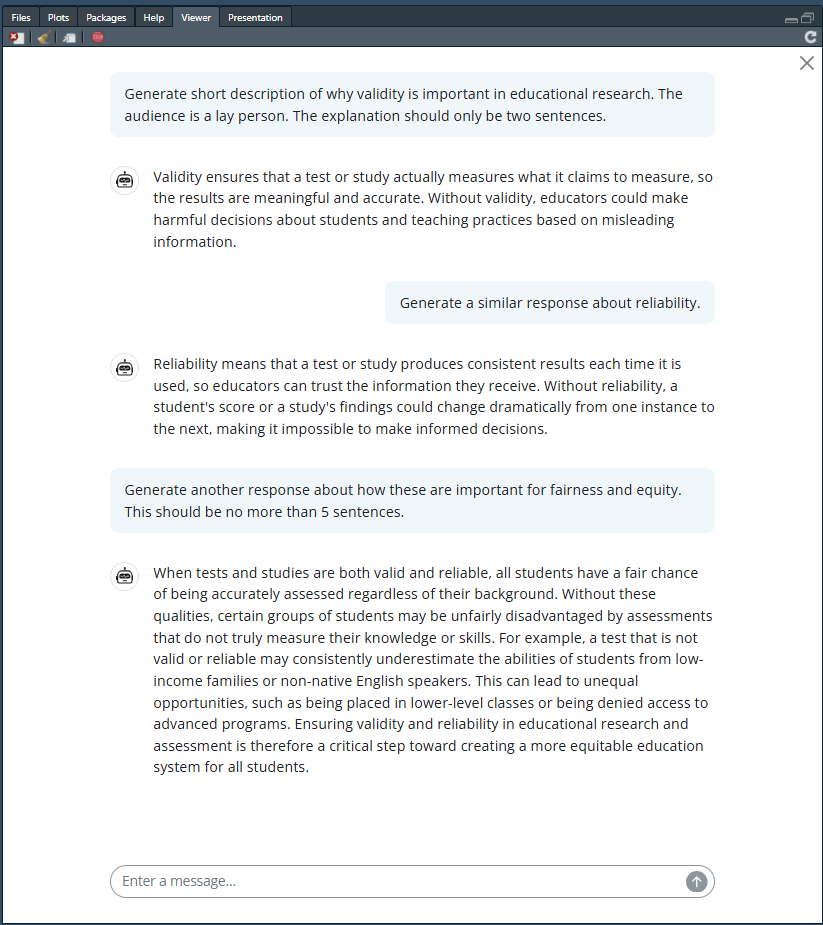{fig-align="center"}## Interactive method callNow let's look at the second method for conversational chats, the interactive call method.Below I've prompted the model via `chat$chat("prompt")`, and then immediately used the same syntax again (with a different prompt).I've hidden the output because it's so long; you'll need to click to see the prompt and model response.::: {.callout-note collapse="true"}## Click to see first prompt and response```{r eq 1}chat$set_turns(list())chat$chat("Tell me about the history of the exploration of the moon")```:::::: {.callout-note collapse="true"}## Click to see follow-up prompt and response```{r eq 2}chat$chat("What are the most important non-USA exploration missions?")```:::As you can see, the second response from the model takes into context the first prompt - it's still talking about the moon!This conversational functionality is useful when you're doing iterative development or planning, as the previous calls to the model are important for providing content and building upon previous prompts and model responses.## `chat_anthropic` DetailsLet's look at the details of `chat_anthropic` (from [this page of the `ellmer` package reference.](https://ellmer.tidyverse.org/reference/chat_anthropic.html))```{r, eval = FALSE}chat_anthropic(system_prompt =NULL,params =NULL,model =NULL,cache =c("5m", "1h", "none"),api_args =list(),base_url =NULL,beta_headers =character(),api_key =NULL,credentials =NULL,api_headers =character(),echo =NULL)```It's important to note the `params` argument, which allows you to set a variety of model parameters when chatting with the model.This is a [general argument](https://ellmer.tidyverse.org/reference/params.html) in the `ellmer` package. You'll need to ensure that your model input allows a specific generation parameter before including it in your call.This is one place where having a conversation with a model via API instead of via a chatbot interface is different - it's not always easy (and sometimes impossible) to change these parameters in the normal chat interface.```{r, eval = FALSE}params(temperature =NULL,top_p =NULL,top_k =NULL,frequency_penalty =NULL,presence_penalty =NULL,seed =NULL,max_tokens =NULL,log_probs =NULL,stop_sequences =NULL,reasoning_effort =NULL,reasoning_tokens =NULL, ...)```### Options for Clearing the ChatThere are two methods to reset the chat history. when you're using the interactive call method.This is useful when you want to start a conversation about another topic.#### Clearing While Maintaining Chat ConfigurationThe following syntax simply clears the turns but maintains the other aspects of the chat configuration (which we'll discuss momentarily). In the background the `ellmer` package is saving a history of your prompts and model responses, and it sending this history as part of the prompt when you send a new prompt.This is also happens when having a conversation with a chatbot, but it's even less obvious.```{r, eval = FALSE}chat$set_turns(list())```#### Clearing All Chat SettingsThis starts an entirely new chat with the Anthropic model, and removes any settings you've made (system prompt, parameters).You can also include this in your argument - the important part is that using `chat_anthropic()` again resets any previously-specified chat configuration.```{r, eval = FALSE}chat <-chat_anthropic()```### Retaining the Chat HistoryAs you interact with a generative AI model through `ellmer`, a record of your prompts and model responses are stored in `chat$get_turns()`.When you examine this list object, each odd-numbered entry (starting with 1) are your prompts, and each even-numbered entry is the model response.::: {.callout-note collapse="true"}## Click to see an example of saving the chat history.```{r chat hist, eval = FALSE}chat <-chat_anthropic()chat$chat("Give me a 5-sentence history of educational measurement.")chat$chat("Give me a 5-sentence summary of educational measurement breakthroughs since 2000.")ed_meas_chat <- chat$get_turns()save(ed_meas_chat, file ="./data/ed_meas_chat.Rdata")``````{r view chat hist}load("data/ed_meas_chat.Rdata")ed_meas_chat[1]ed_meas_chat[2]ed_meas_chat[3]ed_meas_chat[4]```:::---## System PromptsWe briefly discussed system prompts in the [section about generative parameters ](08-gen-ai-parameters.qmd#sec-system-prompt).The system prompt is an instruction to the model that is maintained throughout all of your interactions with the model.I don't generally use system prompts when calling models via API, but I probably should.😅Nonetheless, let's see how changing the system prompt can change the model output.First, with no setting of the system prompt:```{r no system prompt}chat <-chat_anthropic()chat$chat("Briefly tell me the point of using a Rasch model.")## rano <- as.character(rasch_normal)```---Now using a playful system prompt:```{r playful system prompt}chat <-chat_anthropic(system_prompt ="You are an assistant that likes to respond in rhymes.")chat$chat("Briefly tell me the point of using a Rasch model.")```---Some more helpful examples of good system prompts are:- **Specifying Output Structure** - "Always respond in JSON format with keys: 'answer', 'confidence', 'sources'. Never include any text outside the JSON object."- **Setting Constraints** - "You are a medical information assistant. Always: 1. Emphasize you're not a doctor 2. Recommend consulting healthcare professionals 3. Cite medical sources when possible 4. Never diagnose conditions"### Retaining the Chat History with the System PromptThe system prompt is also retained in the chat history, and can be accessed by specifying `chat$get_turns(include_system_prompt = TRUE)`.The list object now has the system prompt as the first object, meaning that your prompts are now every even-numbered object, and the system responses are every odd-numbered object, started at 3.::: {.callout-note collapse="true"}## Click to see an example of saving the chat history with the system prompt.```{r chat hist w system, eval = FALSE}chat <-chat_anthropic("You respond only with the 5 most important sentences about a topic.")chat$chat("Give me a summary of the history of educational measurement.")chat$chat("Give me a summary of educational measurement breakthroughs since 2000.")ed_meas_chat_wsp <- chat$get_turns(include_system_prompt =TRUE)save(ed_meas_chat_wsp, file ="./data/ed_meas_chat_wsp.Rdata")``````{r view chat hist w system}load("data/ed_meas_chat_wsp.Rdata")ed_meas_chat_wsp[1]ed_meas_chat_wsp[2]ed_meas_chat_wsp[3]ed_meas_chat_wsp[4]ed_meas_chat_wsp[5]```:::
